
Is Fanxiang SSD Good? An Honest Buying Review

For buyers asking is Fanxiang SSD good, the answer is a qualified yes for performance-focused storage, with more caution for irreplaceable data. The FanXiang S500 Pro uses Peripheral Component Interconnect Express (PCIe) 3.0 and is marketed for demanding work such as editing (FanXiang).
Model choice matters more than the brand name alone. Before buying, check the physical M.2 slot, supported interface generation, lane configuration, and any console-specific heatsink requirement against the drive you are considering.
Can the Brand’s Reliability Claims Be Trusted?
FanXiang’s reliability claims warrant caution: its advertised validation sits alongside independent reviewers’ quality-control concerns and mixed ownership experiences. Manufacturer testing gives a reason to consider the brand, but the buying recommendation is more conservative for critical data than for replaceable games or media.
Manufacturer testing of the S770 included 80 hours of testing and five tests intended to check stability and reliability. Keep the purchasing question focused on reliability rather than letting an advertised transfer speed become the deciding factor for storing irreplaceable files.
Testing of the S880 produced a clear split between performance results and the reviewer’s purchasing decision: the drive passed performance testing, yet quality-control concerns prompted returning both purchased units (Michael’s Tinkerings). Successful benchmark runs were therefore accompanied by a negative ownership recommendation. Treat that recommendation as a reason for caution when considering this particular model.
Gaming and media storage were the S880 reviewer’s preferred uses where tolerance for data loss was higher. Critical storage received a much less favorable recommendation. For a performance-oriented secondary drive, the buying case centers on the workload and the consequences of losing its contents, rather than speed alone.
S501 commissioning tests initially passed, while the review’s current recommendation is to avoid the drive (Gough’s Tech Zone). Buyers considering the reviewed 1TB model should account for that negative recommendation rather than focusing exclusively on its initial benchmark results. Favoring a cheap purchase over that warning is a purchasing tradeoff, not a reliability advantage.
Positive experiences sit beside an unhappy outcome within the same discussion. Consider those accounts as individual ownership stories when deciding how comfortable the purchase feels for the intended use.
Warranty coverage for the S501 was advertised as three years. Evaluate that model-specific promise separately from the question of trusting a drive with valuable files. A cautious FanXiang purchase puts the intended storage role first, with backups for critical data rather than a sole copy on the drive.
Is Fanxiang SSD Good Across Different Models?
FanXiang solid-state drives (SSDs) offer promising performance, but the buying case differs by model and workload. Advertised sequential speeds favor the faster models, while independent testing adds useful detail about short benchmarks and extended writes. Choosing by the brand name alone misses those differences, particularly when comparing drives intended for different performance levels.
A FanXiang SSD stores files and handles reads and writes in your computer. The range has different performance levels, so the exact model matters more than the brand name alone. Advertised sequential speeds help distinguish those levels, but short benchmark results do not tell the whole story for extended writes. If you regularly write large amounts of data, sustained write results are worth checking alongside the advertised figures.
Look for the exact model’s interface specification and confirm that it matches your computer’s storage connection.
As an Amazon Associate I earn from qualifying purchases.
Model specifications separate the advertised performance tiers rather than describe a single FanXiang experience. Peripheral Component Interconnect Express (PCIe) identifies the interface family, while Non-Volatile Memory Express (NVMe) identifies the storage protocol. Neither label replaces the model-specific speed figures when comparing the drives, because FanXiang advertises different sequential performance within the same interface generation.
| Model | Advertised Specification | Independent Performance Detail |
|---|---|---|
| S500 Pro | PCIe 3.0 NVMe M.2 | Marketed for demanding workflows, including editing |
| S770 | Up to 7300/5200MB/s sequential read/write | Not listed |
| S880 2TB | Up to 7300/6300MB/s sequential read/write | 84MB/s read and 228.80MB/s write at queue depth 1, one thread |
| S880R | Up to 7300/6300MB/s sequential read/write | Not listed |
| S790R | Up to 7400/5200MB/s sequential read/write | Not listed |
| S660 | Up to 5000/4500MB/s sequential read/write | Not listed |
| S501 1TB | PCIe 3.0 x4 | 2807MB/s clean-state read; 1751MB/s peak clean-state write; around 400MB/s after 256GB of writing |
Sequential ratings in the table are maximum product claims, not measurements from a shared comparison test (FanXiang). Independent results occupy a separate column so the advertised figures and measured behavior retain their different meanings. Blank cells keep the comparison focused on concrete specifications without substituting ownership anecdotes for a performance measurement.
S880 testing also included a mixed workload, which combined reading and writing rather than measuring either operation alone. Performance reached 4402MB/s with a 70% read and 30% write mix. That result adds another workload-specific measurement to the model’s performance profile, rather than replacing its sequential specification or the low-queue-depth test.
During extended writing, S501 behavior changed further: speeds approached 300MB/s after roughly 564GB of writes. Average rewrite speed on a fully dirtied drive was 392MB/s, and the full fill-and-verify process took around one hour. Those measurements make extended writing a distinct consideration for this model, separate from its clean-state benchmark results.
Clean-state benchmarks and full-drive testing therefore answer different buying questions for the S501. Short benchmark behavior was good within its cache, while performance after filling was substantially weaker. Sustained transfers deserve particular attention when assessing this drive for work that involves writing large amounts of data, rather than judging it solely by its peak result.
Gaming or media storage was the more favorable use case identified for the S880 in its independent review. Editing was also an advertised use for the S500 Pro, but that positioning is a different kind of claim from a measured workload result. Product choice should match the task being evaluated, not just the largest sequential number.
What Do Peak Speeds Mean for Everyday Work?
The S880’s peak sequential speeds describe one benchmark workload, not every kind of desktop activity. Everyday performance needs a closer look at low-queue-depth and mixed-workload results, because those tests produced different outcomes. Choosing a drive on its largest speed figure alone puts the emphasis on its strongest result rather than the conditions relevant to the intended work.
Test context: the S880 recorded 84MB/s read and 228.80MB/s write at queue depth 1 with one thread, in testing published by Michael’s Tinkerings. Those settings belong alongside the results when judging performance. Reading the numbers without their workload labels would turn a specific measurement into a broader expectation for the drive.
A workload combining 70% reads and 30% writes delivered 4402MB/s during mixed-workload testing, measuring both activities together rather than separately. Meaningful comparisons need to preserve that workload split, which defines the balance represented by the measurement. Other benchmarks remain distinct measurements, rather than results to replace with a single headline number.
Input/output operations per second (IOPS) provide another view: the S880 reached 947,000 read IOPS at queue depth 32 with 16 threads. Treat that as an operations-based result with its own test settings, rather than another transfer-speed figure. Keeping the measurement type visible avoids presenting unlike results as though they answered the same performance question.
Benchmark conditions deserve attention before placing results side by side in a buying comparison. A useful comparison keeps read results with reads, write results with writes, and mixed results with an equivalent mixture. Matching the stated queue depth and thread count also keeps the discussion focused on comparable tests rather than whichever entry has the biggest number.
Desktop buyers should therefore choose the benchmark category that matches the performance question they want answered. Separate questions about reading, writing, and combined activity deserve separate consideration during selection. For a Fanxiang SSD review, the practical value comes from retaining those distinctions, so a promising result stays connected to the particular task being evaluated.
Check Sustained Writes Before Choosing the S501
The Fanxiang S501 1TB is a cautious choice for large writes because its speed falls once its write cache fills. Consider cache exhaustion before choosing this budget drive for transfers that keep writing well beyond its initial burst of faster performance.
Clean-state testing recorded 2807MB/s read and 1751MB/s peak write, while the cache appeared to run out after 256GB of writing (Gough’s Tech Zone). Read performance describes a different operation from saving files, so use the write measurements when assessing a transfer destination.
Post-cache write speed fell to around 400MB/s, then approached 300MB/s after roughly 564GB of writes. Continued writing therefore exposed a further slowdown during the same test. Buyers planning lengthy copying sessions should judge that behavior against their tolerance for waiting, rather than favoring the largest benchmark number.
Rewrite testing averaged 392MB/s when performed on a fully dirtied drive. Filling the drive and verifying its contents took around one hour, with an average round-trip verification speed of about 555MB/s for that workload.
Match the Purchase to Your Transfers
Transfer planning starts with the actual jobs intended for the drive, not a broad label such as everyday use. Follow a purchase check that separates how much data must move, how long the job is allowed to run, and how the drive will be used afterward.
- Identify the largest folder or collection intended for a single copying session. Check its total size before shopping, including everything planned for that session rather than considering only the largest individual file.
- Set an acceptable completion window for that job. Decide whether copying must finish during active work or whether the transfer can occupy a longer period without delaying another task.
- Separate an initial loading job from repeated replacement of stored files. Choose comparison tests matching that pattern, then make sustained-write behavior part of the purchase decision rather than an afterthought.
Short benchmark runs inside the cache were a strength in the S501 review, while filled-drive performance was a weakness. That tradeoff makes the intended workload central to its suitability as a budget purchase.
What Can Be Said About Fanxiang SSD Lifespan?
FanXiang SSD lifespan calls for a cautious buying decision, particularly when the drive will hold irreplaceable data. Gaming or media storage is a better fit for the S880 when losing the stored content would be tolerable.
Initial commissioning tests were successful for the S501. Its review subsequently carried a recommendation against buying the drive, while the S880 review advised caution for critical storage because of quality-control concerns (the independent S501 and S880 reviews).
A buyer prioritizing dependable storage should approach FanXiang more cautiously than someone choosing a performance-oriented secondary drive.
Critical files deserve a separate backup rather than relying on the S880 as their sole home. Choosing that model for replaceable content keeps the purchase aligned with the review’s recommended use.
Will the Drive Fit the Intended System?
FanXiang solid-state drive (SSD) compatibility depends on matching the exact model to the intended system’s physical slot, interface, and cooling requirements. Check those requirements before purchasing rather than relying on a broad compatibility claim. A product described as suitable for demanding workloads still needs the right connection and installation arrangement.
The S880 uses the M.2 2280 form factor, making that designation the physical specification to check against the computer’s supported drive format. Look for the complete designation in the system documentation rather than stopping at “M.2.” Physical format is a separate buying check from advertised transfer speed or the drive’s intended workload.
Interface matching requires checking Peripheral Component Interconnect Express (PCIe) generation and lane configuration. An S880 installation calls for a PCIe 4.0 x4 M.2 slot in the reviewed configuration. Compare that complete interface description with the intended slot’s specification, keeping both the generation number and lane designation in the comparison.
Model names also deserve attention because FanXiang’s lineup includes different interface generations. For example, the S500 Pro is identified as a PCIe 3.0 Non-Volatile Memory Express (NVMe) M.2 drive on FanXiang’s product overview. Treat the exact model designation as part of the purchase decision rather than selecting from the brand name alone.
Console buyers have a specifically positioned option: the S880R includes a heatsink and is marketed for PlayStation 5 (PS5). Verify the console-specific heatsink requirement before ordering. Selecting another model from the range calls for checking its own cooling arrangement, rather than assuming it shares the console-focused version’s included hardware.
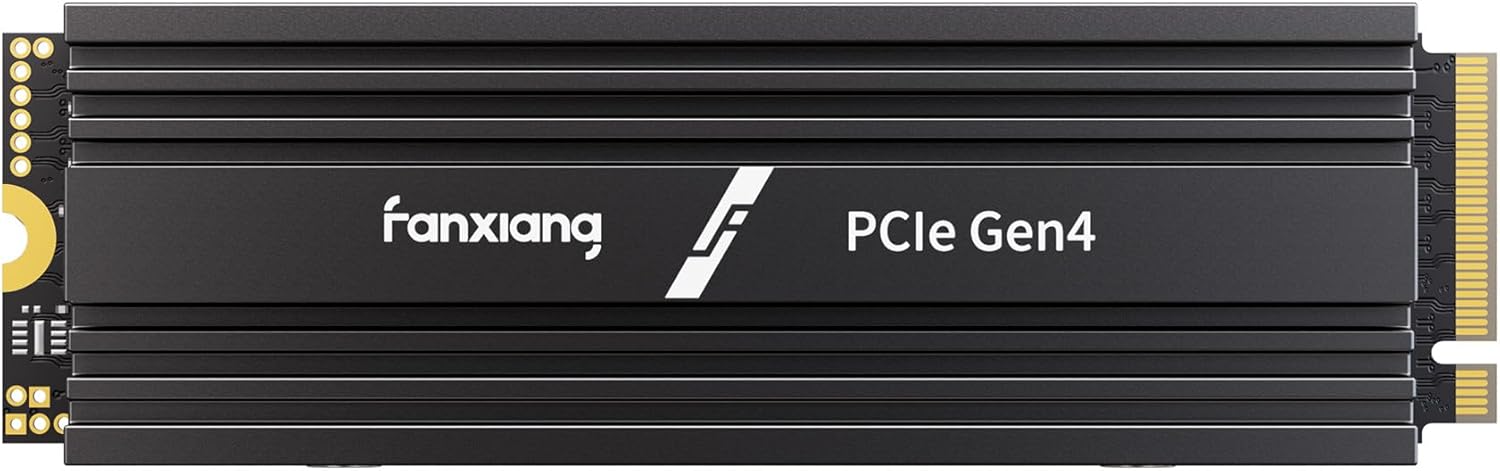
The fanxiang S880R 1TB NVMe SSD expands PS5 game storage with a heatsink already built in. Its aluminum heatsink addresses the cooling hardware you need to consider when choosing a console drive, rather than assuming every fanxiang model includes it. This model uses a PCIe 4.0 x4 interface, also called Gen4x4, and M.2 2280 format, with read speeds up to 7300MB/s. Check that your console is a Sony PlayStation 5, the console model specified for compatibility.
As an Amazon Associate I earn from qualifying purchases.
Installation accessories are another practical detail to inspect in the chosen package. Both an M.2 mounting screw and a screwdriver accompanied the reviewed S880, as recorded in the independent review. Confirm the contents of the exact retail package being purchased, keeping the included tools separate from the system requirements that determine drive compatibility.
Does the Warranty Justify Choosing It over Crucial?
FanXiang’s warranty should be weighed for the exact model and purchase, rather than used as a brand-wide reason to choose it over Crucial. A three-year warranty was advertised for the S501 1TB reviewed by Gough’s Tech Zone. Keep that claim attached to that product when comparing offers.
Historical pricing gives some context for FanXiang’s budget appeal. Two S880 2TB drives were purchased for $83 each in June 2023, as reported in Michael’s Tinkerings. Treat that purchase price as historical context, not a target for a current deal or a comparison with today’s Crucial offerings.
Price-conscious buyers favored Crucial when the competing FanXiang option offered only a small saving, with a larger discount needed to change that preference, forum posters report. Consider that a buying preference rather than a universal rule: the relevant comparison is the specific offer being considered.
Before paying, ask the seller to confirm the warranty term, exclusions, regional coverage, and return authorization process for the selected drive. Make customer support part of that conversation, including how a warranty claim would be handled. Choose on the purchase terms being offered, rather than letting the length of a warranty stand in for the service expected afterward.
I dislike articles that say ‘it depends’ without saying on what, largely because that phrase can turn a useful buying check into decorative fog. On a Fanxiang SSD warranty, it depends on the term, exclusions, regional coverage, return authorization process, and customer support, so I would ask the seller to confirm those points before treating a small price difference as a reason to switch from Crucial.
Frequently Asked Questions
Are Fanxiang SSDs Suitable for a Main System Drive?
Fanxiang’s S770 offers advertised sequential read and write speeds up to 7300MB/s and 5200MB/s, respectively (FanXiang). The S660 has lower advertised limits of 5000MB/s read and 4500MB/s write, making the specific model relevant to a performance-focused system-drive choice.
Why Does the S501 Slow Down During Large Writes?
The reviewed S501 uses an SMI SM2263XT controller without dedicated dynamic random-access memory (DRAM), paired with 128-layer flash memory (Gough’s Tech Zone). Its controller design places it in the value-oriented, DRAM-less storage category.
Which Fanxiang SSD Is Marketed for PS5?
FanXiang advertises the S880R as a PCIe 4.0 NVMe SSD with a heatsink for PS5. Check the console’s fit and cooling requirements before buying, and do not assume other FanXiang models include the same heatsink arrangement.
References
- What are the Advantages of Solid State Drives? | Unveiling SSD Benefit, FanXiang, FanXiang, fanxiangssd.com
- Blogs, tagged "FanXiang S500 Pro", FanXiang, FanXiang, fanxiangssd.com
- Buyers Beware: Fanxiang S880 2TB PCIe 4.0 x4 NVMe SSD Review, Michael's Tinkerings, michaelstinkerings.org
- is Fanxiang a legit SSD brand?, Reddit, reddit.com
- Fanxiang S660 4TB PCIe Gen4 NVMe SSD Review | ServeTheHome Forums, ServeTheHome Forums, forums.servethehome.com
- Glotrends PA09-HS Adapter) | Gough's Tech Zone, Gough's Tech Zone, goughlui.com
- Fanxiang s770: too good to be true? – CPUs, Motherboards, linustechtips.com
- What is Fanxiang? Is it a generic brand? How are their hard drives?-zhihu, Zhihu, zhihu.com
- Is Fanxiang Ssd Good? A Comprehensive Review, ssdbuddy.com
- Wikidata Q487343 / Wikipedia, Solid-state drive, en.wikipedia.org
Sources read in September 2026.